Binary Search Pseudocode O Level Computer Science 2210:
Table of Contents
In the Cambridge O Level Computer Science (2210) curriculum, efficiency is a core focus of Paper 2. While a linear search is straightforward, it becomes highly inefficient when handling massive datasets. This is where the Binary Search algorithm becomes essential.
Understanding how to write, trace, and optimize binary search pseudocode is a frequent requirement in CAIE examinations. This technical guide outlines the core mechanics, strict pseudocode syntax, and standard execution path expected by examiners.
The Core Logic: The “Divide and Conquer” Strategy
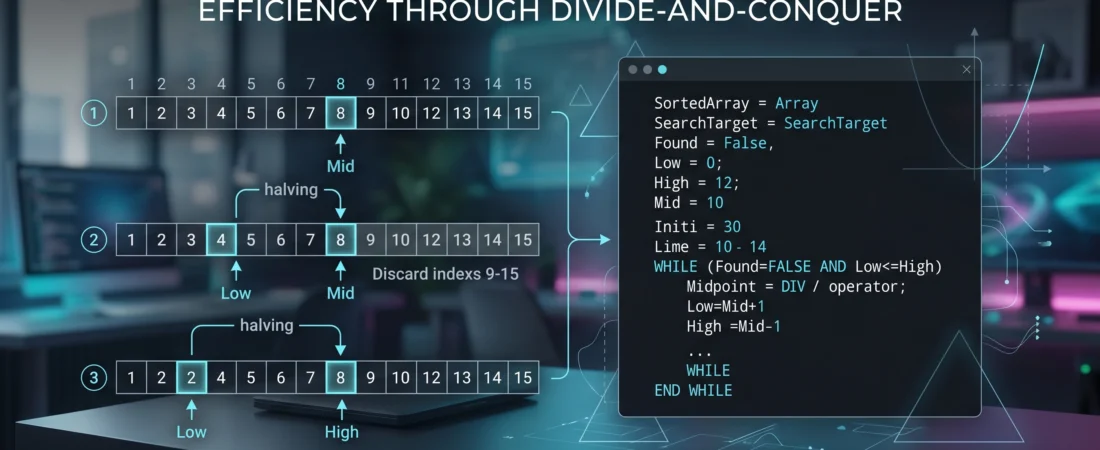
A binary search utilizes a “divide and conquer” approach to locate a target value within a collection of data. Unlike a linear search, which checks every element sequentially, a binary search continuously divides the search space in half.
Critical Rule: A binary search cannot function on an unsorted list. The data array must be sorted in ascending or descending order before the search begins.
The algorithm functions by identifying the middle element of the current search space:
- If the target value matches the middle element, the search concludes successfully.
- If the target value is smaller than the middle element, the entire upper half of the array is discarded, and the search repeats on the lower half.
- If the target value is larger than the middle element, the lower half is discarded, and the search continues on the upper half.
By halving the remaining items with every iteration, the algorithm achieves a time complexity of $O(\log n)$. For an array of 1,000 items, a linear search could take up to 1,000 comparisons, whereas a binary search will locate the item in a maximum of 10 comparisons.
The Standard 2210 Pseudocode Implementation
When answering algorithm design questions on the official Cambridge O Level Computer Science (2210) assessment, adherence to explicit pseudocode standards is mandatory.
Below is the standard, exam-compliant implementation for a binary search operating on a pre-sorted array containing 100 elements:
// Variable Declaration
DECLARE SortedArray : ARRAY[1:100] OF INTEGER
DECLARE SearchTarget : INTEGER
DECLARE Found : BOOLEAN
DECLARE LowPointer : INTEGER
DECLARE HighPointer : INTEGER
DECLARE MidPointer : INTEGER
// Initialization
Found <- FALSE
LowPointer <- 1
HighPointer <- 100
OUTPUT “Enter the integer value to find: “
INPUT SearchTarget
// The Binary Search Loop
WHILE (Found = FALSE) AND (LowPointer <= HighPointer)
// Calculate the midpoint using integer division
MidPointer <- DIV(LowPointer + HighPointer, 2)

IF SortedArray[MidPointer] = SearchTarget THEN
    Found <- TRUE
ELSE
    IF SortedArray[MidPointer] > SearchTarget THEN
        // Discard the upper half by shifting the High Pointer
        HighPointer <- MidPointer - 1
    ELSE
        // Discard the lower half by shifting the Low Pointer
        LowPointer <- MidPointer + 1
    ENDIF
ENDIF
ENDWHILE
Detailed Structural Breakdown
- Pointers (
LowPointerandHighPointer): These variables mark the active boundaries of the search area. Initially, they are set to the first (1) and last (100) indexes of the array. - The Midpoint Calculation: The expression
DIV(LowPointer + HighPointer, 2)performs integer division. This discards any fractional components (remainders) to ensure the index evaluates to a whole number. - Adjusting the Boundaries: If the target value is not found at the
MidPointer, the boundaries shift:- Moving
HighPointer <- MidPointer - 1eliminates everything to the right of the midpoint. - Moving
LowPointer <- MidPointer + 1eliminates everything to the left of the midpoint.
- Moving
- Loop Termination: The loop breaks under two conditions: if
Foundtransitions toTRUE, or ifLowPointerexceedsHighPointer. If the pointers cross, it proves the item does not exist within the dataset.
Essential Comparison Matrix
When preparing for Paper 2 design and evaluation questions, review these structural differences between the two primary searching techniques:
- Data Requirements: Linear search accepts fully unsorted arrays; Binary search strictly demands structured, sorted arrays.
- Performance Metrics: Linear search execution time scales linearly ($O(n)$) with dataset size. Binary search efficiency scales logarithmically ($O(\log n)$), maintaining high speed even across massive databases.
- Structural Complexity: Linear search requires a single loop and a basic increment counter. Binary search requires tracking multiple moving pointer bounds and re-calculating indices inside each iteration block.
For a deeper look into implementing basic arrays and iterative constructs, check out the foundational W3Schools Computer Science guide for structured programming logic.
Common Examination Errors to Avoid
Analysis of candidate performance highlights frequent logic errors that result in dropped marks:
- Using a Fixed
MidPointerFormula Outside the Loop: The midpoint calculation must reside inside theWHILEloop block so that it recalculates with each boundary modification. - Pointer Cross-Over Logic: Ensure the loop conditional reads
LowPointer <= HighPointer. Changing this to<causes the algorithm to skip validation when only a single element remains in the search space. - Incorrect Adjustments: Setting boundaries to
HighPointer <- MidPointerinstead ofMidPointer - 1can trap the execution flow inside an infinite loop when dealing with adjacent pointers.
For full clarity on standard programming syntax expectations, refer to the Cambridge O Level Computer Science Coursebook via Cambridge University Press to align your vocabulary with the assessment team.
Summary
The binary search pseudocode o level computer science 2210 framework demonstrates how mathematically driven data structures optimize runtime. Mastering the manipulation of boundaries, flags, and integer division logic guarantees structural accuracy on data verification questions in Paper 2.
Some other GEEKMATREX Guides:
Linear Search Pseudocode O Level Computer Science 2210: A Complete Student Guide
The Ring 0 Conflict: Kernel-Level Anti-Cheat Explained (and Why Your PC Crashes)
Is Process Lasso Safe? The Truth About Bans, Viruses, and System Stability (2026 Review)
Stop Using Game Boosters: Why Process Lasso is the Only Tool You Need (2026 Guide)
Stop Your Phone Overheating: The Technical Guide to Fixing Android AI Battery Drain Fix (2026)
Stop CPU Core Parking: How to Unlock Ultimate Performance Windows 11 (Free Tool)
Intel vs AMD in 2026: Which CPU Is Better for Gaming, Work, and Budget Builds?
Android Optimization in 2026: Make Any Phone Faster, Smoother, and More Battery-Friendly
How to Remove Bloatware Safely on Android (No Root) — 2026 Step‑By‑Step Guide