GPU Cost Per Frame 2026:
Table of Contents
The PC hardware market is engineered to separate you from your money. Tech reviewers constantly hype up the newest $1,200 flagship graphics cards, focusing entirely on maximum frame rates and synthetic benchmark scores.
But if you approach PC building analytically, buying the absolute top-tier card is almost always a mathematical failure.
To build a rig intelligently, we cannot just look at the raw FPS. We have to map out the current market data and apply basic economic principles. Today, we are going to calculate the exact cost-to-performance ratio of the current market and find the mathematical sweet spot for your next upgrade.
Section 1: The Math of Diminishing Returns
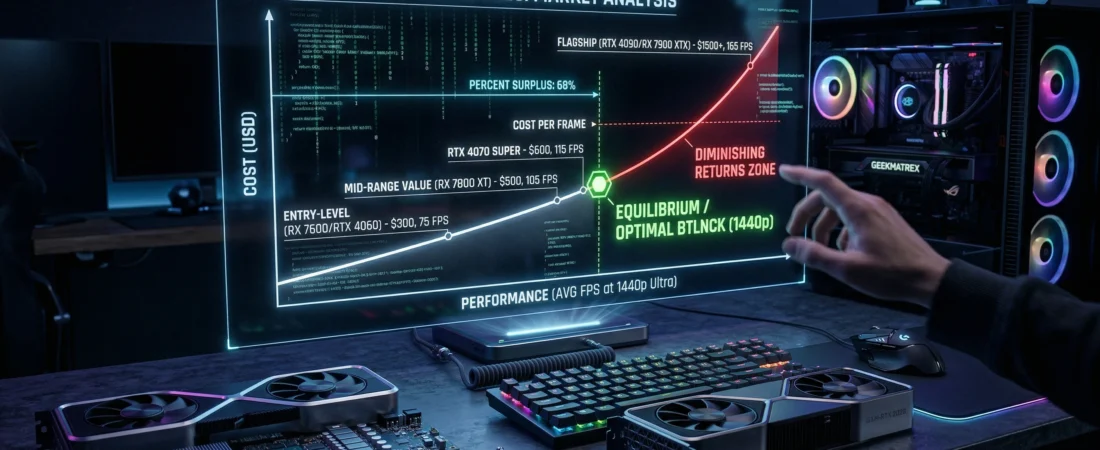
The most important metric in PC building isn’t Teraflops or VRAM; it is the Cost Per Frame. You calculate this simply by dividing the retail price of the GPU by its average frame rate in a standard suite of games at your target resolution.
Let’s look at the current 1440p data (referencing aggregate data from trusted sources like the Tom’s Hardware GPU Benchmark Hierarchy):
- The Mid-Range (e.g., RX 7800 XT): Priced around $500, delivering an average of 100 FPS at 1440p Ultra.
- Cost: $5.00 per frame.
- The Flagship (e.g., RTX 4080 Super): Priced around $1,000, delivering an average of 135 FPS at 1440p Ultra.
- Cost: $7.40 per frame.
You are paying a 100% price premium for only a 35% increase in performance. This is a brutal, textbook example of Diminishing Marginal Returns. As you move higher up the product stack, the silicon becomes exponentially more expensive to manufacture, and those costs are passed directly to you for increasingly smaller gains.
Section 2: Finding the Market Equilibrium
If the flagship cards are a bad deal, where is the optimal point to buy? We need to find the market equilibrium—the exact intersection where the supply pricing meets the actual demands of modern game engines.
According to the latest Steam Hardware & Software Survey, the vast majority of PC gamers are still playing at 1080p, with a rapid migration toward 1440p. 4K gaming remains a statistical minority.
Therefore, the “Equilibrium Point” for 2026 is a GPU that can completely saturate a 1440p, 144Hz monitor without dropping below 60 FPS in heavy path-traced titles.
Right now, that equilibrium sits squarely in the $500 to $600 tier. Cards like the RTX 4070 Super and the RX 7800 XT provide exactly enough compute power to clear the 1440p hurdle. Buying anything above this tier means you are paying for “dead headroom”—performance metrics that your monitor physically cannot display.
Section 3: Maximizing Your Consumer Surplus
To make the smartest purchasing decision, we can apply the economic concept of Consumer Surplus. This represents the difference between the maximum price a consumer is willing to pay and the actual market price they do pay.
In a standard market model, this is the area below the demand curve $D(Q)$ and above the equilibrium price $P_e$:
$$CS = \int_{0}^{Q_e} D(Q) dQ – P_e Q_e$$
When you buy a flagship GPU, the manufacturer extracts almost all of your potential consumer surplus. They price the card at the absolute ceiling of what enthusiasts are willing to pay.
When you buy at the equilibrium point (the mid-range tier), you retain a massive consumer surplus. You get top-tier 1440p performance, and you keep $500 in your pocket.
The GeekMatrex Verdict
Stop looking at the maximum FPS sliders in YouTube videos. Look at the data.
If you are upgrading your PC in 2026, find the card that hits the equilibrium point for your specific monitor’s resolution. Buy the mid-range value king, secure your consumer surplus, and use the saved money to invest in a better OLED display or a faster NVMe SSD—upgrades you will actually notice every time you turn on your PC.
Have you mapped out the cost per frame for your current rig? Let us know what GPU you think holds the absolute best value in 2026 in the comments below!
Some other GEEKMATREX Guides:
The Ring 0 Conflict: Kernel-Level Anti-Cheat Explained (and Why Your PC Crashes)
Is Process Lasso Safe? The Truth About Bans, Viruses, and System Stability (2026 Review)
Stop Using Game Boosters: Why Process Lasso is the Only Tool You Need (2026 Guide)
Stop Your Phone Overheating: The Technical Guide to Fixing Android AI Battery Drain Fix (2026)
Stop CPU Core Parking: How to Unlock Ultimate Performance Windows 11 (Free Tool)
Intel vs AMD in 2026: Which CPU Is Better for Gaming, Work, and Budget Builds?
Android Optimization in 2026: Make Any Phone Faster, Smoother, and More Battery-Friendly
How to Remove Bloatware Safely on Android (No Root) — 2026 Step‑By‑Step Guide