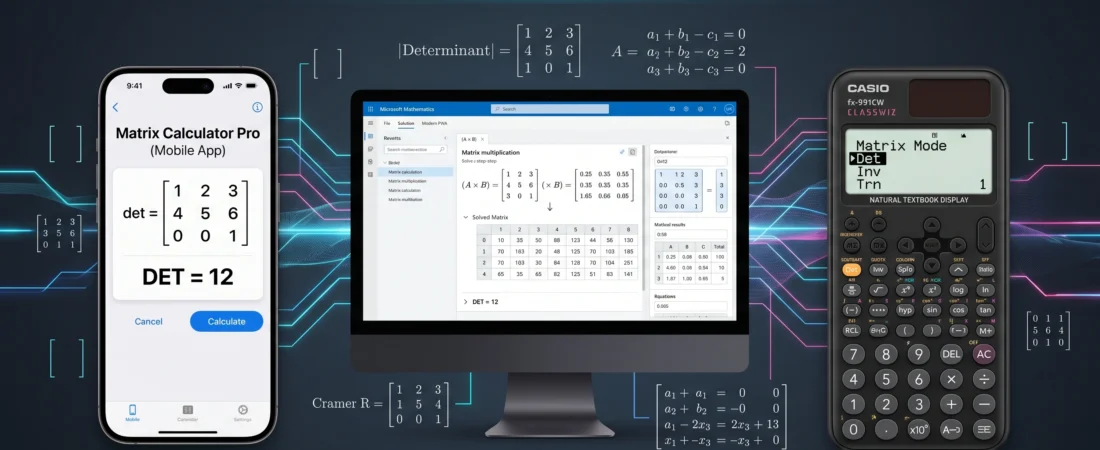
Matrix calculation apps for computer science students:
Table of Contents
For university students in Computer Science, engineering, or physics, linear algebra is not just a math course; it is the foundation of graphics rendering, data analysis, and advanced algorithm design. Mastering multi-dimensional arrays, determinant calculation, and matrix inversion is essential.
While working through complex transformations in my Applied Physics labs, I realized that manual calculations for a $3 \times 3$ or $4 \times 4$ matrix are slow and prone to errors. To optimize your study workflow, you need reliable validation tools. This guide reviews the best matrix calculation apps for computer science students in 2026, comparing mobile convenience, desktop power, and dedicated scientific hardware.
The Strategic Utility of Matrix Apps
A matrix solver is not a cheating tool; it is a verification and debugging asset. When writing C++ code for multi-dimensional arrays, your logic must produce mathematically sound results.
These apps allow you to cross-verify:
- Determinants and Inverses: Critical for solving simultaneous linear equations.
- Matrix Multiplication: Validating the complex inner product logic.
- Gaussian Elimination: Stepping through row operations for system solutions.
A fast, reliable verification app reduces the time spent debugging arithmetic errors, allowing you to focus on high-level algorithm logic.
1. The Mobile Contender: Matrix Calculator Pro
Available on both iOS and Android, Matrix Calculator Pro (2026 Edition) is the primary choice for students needing fast, “on-the-desk” verification during study sessions.
Why it’s essential: It features an intuitive matrix grid input system that allows you to define matrices up to $10 \times 10$ quickly.
Key Strengths for CS Students:
- Instant Solutions: Calculates Determinants, Trace, Transpose, and Inverse in one click.
- Step-by-Step Modes: Offers detailed breakdown options for Gaussian Elimination and Cramer’s Rule, which are vital for Paper 2 style understanding.
- Complex Numbers Support: Crucial for Applied Physics and advanced electrical engineering modules.
2. The Desktop Workhorse: Microsoft Mathematics (Modern Edition)
For deep dives, project work, and complex assignments, the modern, PWA (Progressive Web App) version of Microsoft Mathematics is a powerhouse.
Why it’s essential: It seamlessly integrates a graphing calculator with a robust Computer Algebra System (CAS).
Key Strengths for CS Students:
- Full Equation Solver: Allows you to define entire systems of simultaneous equations and solve them using matrix methods.
- C++ Array Mapping: The desktop interface makes it easier to input large datasets, allowing you to map the results directly back to your multi-dimensional array structures in your IDE.
- Advanced Operations: Robust support for Eigenvalues and Eigenvectors, which are foundational for 3D graphics transformations and machine learning modules.
You can download the desktop client directly from the Official Microsoft Math website.
3. The Hardware Reference: The Casio ClassWiz 991CW
In an academic or exam setting, where mobile devices are prohibited, the dedicated scientific calculator is your ultimate tool.
Why it’s essential: While apps are good for homework, the Casio fx-991CW is the exam-approved hardware standard for university engineering and CS students in 2026.
Key Strengths for CS Students:
- Dedicated Matrix Mode: The 991CW features a refined menu system that handles matrices up to $4 \times 4$.
- Speed and Accuracy: It offers instantaneous results for Determinants, Transpose, Identity Matrices, and Inversion, all without requiring an internet connection.
- Input Verification: The High-Resolution “Natural Textbook Display” reduces input error, which is the most common pitfall when working with scientific calculators.
GeekMatrex Verdict: Which Tool Wins?
As a C++ programmer and tutoring expert, I advise students to integrate all three.
- For Homework Verification: Use Matrix Calculator Pro (Mobile) for instant feedback.
- For Coding and Projects: Use Microsoft Mathematics (Desktop) to map complex array data.
- For Exams and Lectures: Master the Casio 991CW (Hardware) as your dependable, compliant reference.
By structuring your math workflow with these matrix calculation apps for computer science students, you convert slow arithmetic tasks into efficient logic checks, accelerating your academic progress.
Can a matrix calculation app replace learning the manual method?
Absolutely not. You must master Cramer’s Rule, Gaussian Elimination, and determinant formulas manually. The app is for verification only. In an exam, you are graded on your work, not just the final answer. The app tells you if you are wrong, not why you are wrong.
Why should I use a dedicated matrix app instead of Wolfram Alpha?
Wolfram Alpha is excellent, but requires an active internet connection. Dedicated offline matrix apps (like Matrix Calculator Pro) provide instantaneous results without data dependency, which is vital in labs or lecture halls with poor connectivity.
Can these apps handle matrices larger than 4×4?
Yes. Both Matrix Calculator Pro (mobile) and Microsoft Mathematics (desktop) can comfortably handle $10 \times 10$ matrices or larger. Hardware calculators like the Casio 991CW are usually limited to $4 \times 4$ due to processing power and screen size restrictions.
How can I use these apps when debugging my C++ array code?
When your multi-dimensional array code is outputting an incorrect result, you can input the raw matrix data from your program into the app. Compare the determinant, inverse, or multiplication results. If the app’s output matches your code, your C++ implementation is correct, but your initial data or mathematical approach is wrong.
Some Other GeekMatrex Posts:
Linear Search Pseudocode O Level Computer Science 2210: A Complete Student Guide
Binary Search Pseudocode O Level Computer Science 2210: A Complete Technical Guide