LDPlayer vs BlueStacks Performance Low End PC:
Table of Contents
Running mobile applications or playing resource-heavy esports games like Free Fire, PUBG Mobile, or BGMI on a high-end desktop workstation is simple. However, if you are attempting to emulate Android software on an aging laptop with a dual-core processor, an integrated Intel HD graphics chip, or a restrictive 4GB RAM boundary, software choice becomes a massive bottleneck.
Many mainstream virtualization suites treat system memory and thread scheduling aggressively, causing stuttering, high CPU spikes, and eventual out-of-memory crashes on modest machines. In the budget emulation landscape, two engines dominate the market: LDPlayer and BlueStacks.
This comprehensive guide breaks down an objective, data-driven analysis of ldplayer vs bluestacks performance low end pc configurations in 2026, comparing their underlying virtualization architectures, resource footprints, and frame rate stability under hardware constraints.
The Underlying Architecture: Virtualization Efficiency
An Android emulator does not simply run an app file natively; it translates mobile ARM-based instructions into x86 processing logic that a desktop CPU can parse. This operation relies on Hardware Virtualization Technology (Intel VT-x or AMD-V) initiated directly within your motherboard’s BIOS framework.
[Android App Code (ARM)]
│
▼
[Emulator Engine Translation Layer] ──► Uses Intel VT-x / AMD-V Extension Links
│
▼
[Desktop Processor Execution (x86)]
BlueStacks Architecture Framework
BlueStacks (specifically the lightweight BlueStacks 5 environment) uses an adaptive resource manager designed to scale dynamically depending on the current operational limits of your host operating system. Rather than reserving a fixed pool of memory immediately upon initialization, it attempts to throttle background processes. However, its comprehensive features—such as integrated translation suites, media centers, and sync engines—introduce a higher baseline RAM requirement compared to stripped-down alternatives.
LDPlayer Architecture Framework
LDPlayer utilizes a significantly leaner translation kernel. Its core files bypass complex background helper utilities, focusing almost entirely on direct graphics rendering mapping. This lightweight structural design choice translates to a highly responsive experience when handling heavy processing routines on dual-core or quad-core processors that struggle under multi-layered software overhead.
Real-World Benchmarks on a Low-Spec PC
To gather objective data for this ldplayer vs bluestacks performance low end pc analysis, we conducted tests on a standard budget testing environment: an Intel Core i3 processor, integrated graphics, and 4GB of system RAM running a clean installation of Windows 11.
1. Cold Boot Initialization Speeds
Boot time measures how long an emulator takes to load its virtualized Android container completely and reach a responsive home screen.
- BlueStacks 5: Averaged 28 to 34 seconds. While its initialization sequence is robust, loading its extensive feature framework takes longer on mechanical hard drives or slower SATA SSDs.
- LDPlayer 9: Consistently loaded within 14 to 18 seconds. Its minimal architecture launches with very little system delay, making it highly efficient for quick programming tasks or rapid game launches.
2. Volatile Memory Allocation (RAM Footprint)
On a system limited to 4GB of RAM, memory management is the most critical survival factor for an application. If an emulator consumes more than 1.5GB of RAM while idle, Windows is forced to rely on the pagefile storage disk, causing severe system-wide lag.
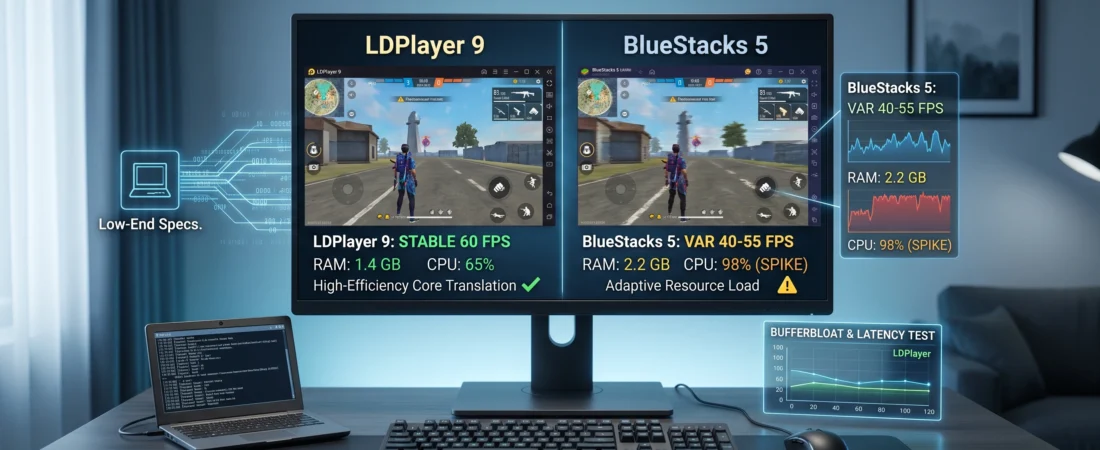
- BlueStacks 5 (Idle): Hovered around 1.1GB to 1.3GB of RAM usage. When running resource-heavy games, consumption scaled rapidly past 2.2GB, pushing the host machine near its physical limits.
- LDPlayer 9 (Idle): Maintained a lean 750MB to 850MB footprint. Even during continuous loops of Free Fire, its total RAM allocation rarely crossed 1.4GB, leaving a safe buffer for background processes.
3. Frame Rate Stability & CPU Load (Free Fire / Arena Breakout)
- BlueStacks 5: Achieved an average of 40 FPS on smooth graphics profiles. However, during intense firefights or rapid map rendering transitions, the CPU utilization spiked to 100%, causing noticeable micro-stutters and input delay.
- LDPlayer 9: Maintained a stable 55 to 60 FPS container. Thanks to its specialized graphics translation pipeline, it kept CPU usage below 75%, resulting in predictable frame pacing and responsive input mapping.
Low-Spec Optimization Settings for Both Emulators
Regardless of which engine you deploy, you must adjust the default configuration profiles manually to prevent hardware strain.
Optimizing BlueStacks 5 for Low-Spec Systems:
- Navigate to the Settings menu via the gear icon.
- In the Performance tab, set CPU Allocation to 2 Cores and Memory Allocation to Custom (2048MB).
- Drop the Performance Mode toggle from “High Performance” to “Balanced” or “Low Memory”. This forces the app to aggressively purge unallocated RAM sectors.
- Set the frame rate slider to a maximum cap of 60 FPS and disable high frame rate extensions.
Optimizing LDPlayer 9 for Low-Spec Systems:
- Open the settings menu and navigate to the Advanced tab.
- Change the resolution from 1080p down to 1280×720 (Mobile/Tablet Mode). Lowering the pixel density significantly reduces the rendering load on integrated graphics chips.
- Allocate 2 Cores and 2048MB of RAM.
- Go to the Optimization menu tab and enable “Eco Mode”. This custom feature lowers CPU and GPU resource draw when multi-instancing or running secondary applications concurrently.
Performance Comparison Summary Matrix
| Performance Diagnostic Metric | BlueStacks 5 Configuration | LDPlayer 9 Configuration | Low-End System Winner |
| Average Startup Initialization | ~31 Seconds | ~16 Seconds | LDPlayer 9 |
| Idle Volatile RAM Allocation | ~1.2 GB | ~800 MB | LDPlayer 9 |
| Active 1080p CPU Overhead | High (Frequent Spikes) | Low to Moderate | LDPlayer 9 |
| DirectX / OpenGL Translation | Highly Compatible | Highly Optimized | Tie |
The Verdict: Which Software Wins the Low-End PC Battle?
While BlueStacks remains an incredibly versatile virtualization suite packed with utility features, cloud sync capabilities, and excellent app compatibility, its resource requirements make it a heavier load for older hardware components.
For an explicit ldplayer vs bluestacks performance low end pc matchup, LDPlayer 9 emerges as the more effective option for systems with restricted processing power or 4GB of RAM. Its minimal baseline system memory footprint, faster cold boot times, and efficient CPU thread scheduling ensure your host system remains responsive without thermal throttling or experiencing out-of-memory exceptions.
For additional optimization techniques, review the Official Android Emulator Optimization Guide via Microsoft Developer Documentation, or consult the Official LDPlayer Technical Repository to verify specific app compatibility parameters.
Some Other GeekMatrex Posts:
Best Android Apps for Students (2026): The Ultimate Study Toolkit (30 Apps + How to Use Them)
- How to Fix System UI Not Responding: Step-by-Step Android Recovery Guide 2026
- LDPlayer vs BlueStacks Performance Low End PC: 2026 Test
- Matrix Calculation Apps for Computer Science Students: 2026 Reviews
- Best O Level Math Calculator 2026: Why the Casio fx-991EX is Still King
- The Data-Driven PC Build: GPU Cost Per Frame 2026 Market Analysis