Quadro P620 Gaming Performance & Windows 11 Drivers:
Table of Contents
When building a budget PC or repurposing an enterprise desktop, users frequently run into low-profile workstation graphics cards. Among the most common secondary-market finds is the NVIDIA Quadro P620.
Engineered specifically for computer-aided design (CAD) and multi-display professional setups, the P620 isn’t explicitly marketed as a gaming component. However, underneath its small form factor profile lies architecture closely related to consumer GeForce hardware.
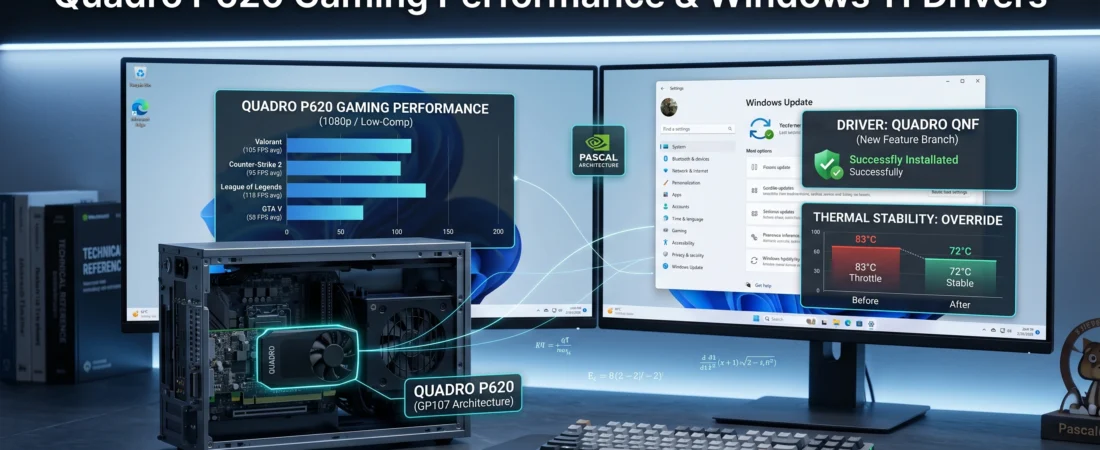
This guide analyzes the actual Quadro P620 gaming performance windows 11 drivers integration, detailing how to unlock optimal frame rates while maintaining low system temperatures.
Under the Hood: The Pascal GP107 Architecture
To understand how this card handles modern rendering loops, we must inspect its underlying hardware architecture. The Quadro P620 is built on a scaled-down variant of the Pascal GP107 chip, the exact same architecture powering the consumer GeForce GTX 1050 series.
Core Hardware Metrics:
- CUDA Cores: 512
- Memory Configuration: 2GB or 4GB variants of GDDR5
- Memory Bus Width: 128-bit
- Total Graphics Power (TGP): A highly efficient 40W (drawn entirely from the PCIe slot, no external 6-pin power cables needed).
Because it relies on 512 CUDA cores, its raw processing capacity sits slightly below a stock GTX 1050 (which features 640 CUDA cores). The main bottleneck for modern titles in 2026 is the 2GB VRAM buffer found on standard variants. If a game’s asset textures exceed this limit, the system is forced to swap data back and forth over the PCIe bus to standard system RAM, causing sudden frame drops.
The Driver Conflict: Enterprise vs. Game Ready
The biggest pitfall for users setting up a Quadro P620 on Windows 11 is driver selection. By default, Windows Update installs NVIDIA’s Quadro Optimal Driver for Enterprise (ODE).
While the ODE driver provides extreme stability for software systems like AutoCAD or SolidWorks, it lacks the explicit day-one game patches and shader compilation loops found in consumer drivers.
To bypass this on Windows 11 and maximize frame generation efficiency, you must install the NVIDIA Desktop Quadro New Feature (QNF) Driver or utilize a modified package.
Step-by-Step Stable Driver Installation Setup:
- Navigate to the official NVIDIA Driver Downloads Page.
- Set Product Type to Quadro, Product Series to Quadro Series (Notebooks or Desktop), and select Quadro P620.
- Set the Operating System to Windows 11.
- Change the Download Type from Production Branch/Enterprise to New Feature Branch (QNF).
- Download the installer package, run it, and select Custom Installation $\rightarrow$ Perform a Clean Installation. This wipes the legacy enterprise cache completely.
Real-World Gaming Performance Benchmarks
Given its hardware boundaries, the Quadro P620 targets 720p (HD) High settings or 1080p (Full HD) Low/Competitive settings in modern esports software pipelines.
Esports Optimization (1080p)
- Counter-Strike 2 / Valorant: Maintaining a Low-preset configuration yields a stable 80–110 FPS. The CPU handles the bulk of geometry parsing, allowing the 512 CUDA cores to render fast frames easily.
- League of Legends: Easily achieves over 120+ FPS at Medium-High settings at full 1080p resolution.
Heavy AAA Titles (720p / Low)
- Grand Theft Auto V: Runs smoothly at 50–60 FPS on Normal settings at 1080p, as its game design matches older hardware memory architectures perfectly.
- Modern Open-World Engines: For more intensive render environments, scaling the internal engine resolution down to 720p or deploying third-party upscalers like Lossless Scaling (FSR) is mandatory to stay above a playable 30–40 FPS boundary.
Thermal Optimization & Fan Management
Because the P620 is built into a tiny single-slot profile with a minimal heatsink setup, thermal throttling is an immediate risk when pushing it under full load. If the core temp crosses 83°C, the clock speed drops automatically to protect the silicon.
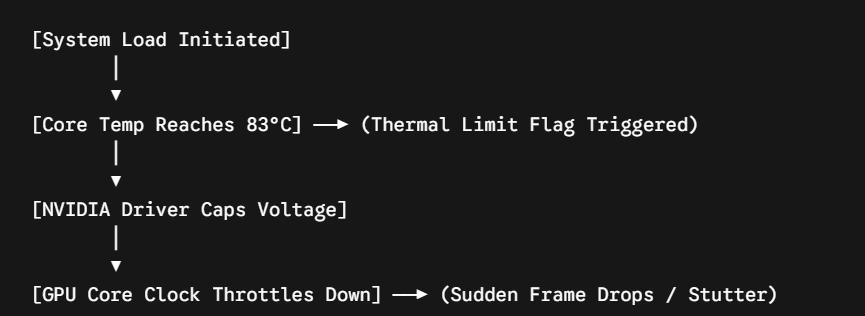
To counter this, download MSI Afterburner via the Official Distribution Network to set up a manual hardware configuration override:
- Open MSI Afterburner settings and navigate to the Fan tab.
- Check the box to Enable user-defined software automatic fan control.
- Adjust the curve aggressively: force the fan speed to hit 80% speed once the temperature crosses 65°C.
- Ensure your internal PC case layout has unobstructed airflow to assist the card’s low-profile fan assembly.
| Metric Category | Enterprise Driver Setup | Optimized QNF Driver Setup |
| 1080p Esports Stability | Frame drops during explosions | Consistent pacing, 10% higher 1% lows |
| DirectX 12 API Stability | Variable framerates | Stable memory allocation loops |
| Peak Core Temperatures | 81°C (Passive Fan Profile) | 72°C (Custom Curve Overrides) |
Can the Quadro P620 run standard GeForce Game Ready Drivers?
Not directly through normal installers. The standard GeForce setup executable blocks installation when it detects enterprise hardware strings. You must download the dedicated Quadro QNF drivers, which contain the consumer game logic improvements wrapped in a package that recognizes the P620’s hardware ID.
Is the 2GB version of the P620 enough for modern gaming in 2026?
It is sufficient for esports titles (Valorant, CS2, Dota 2) and older titles. However, for modern AAA games, a 2GB VRAM buffer causes asset stuttering. You will need to lower your texture resolution quality to “Low” to keep the VRAM footprint under the physical hardware threshold.
Does the Quadro P620 support Windows 11 completely?
Yes. Unlike older Kepler-based enterprise components, the Pascal-based Quadro P620 fully supports DirectX 12 (Feature Level 12_1), WDDM 3.0, and matches Microsoft’s strict hardware security parameters for clean Windows 11 updates.
Some Other GeekMatrex Posts:
- How to Clear NVMe SSD Cache Windows 11: Restore Maximum Speed
- Network Optimization: The Ultimate Guide to Improving PC Speed and Stability in 2026
- Stress Test: How to Check PC Hardware Stability with Free Software 2026
- Quadro P620 Gaming Performance & Windows 11 Drivers: The Optimization Guide
- Apps for Computer: Top 10 Must-Have PC Software Programs for 2026